
Documentation Video

What is XERNOX SHIELD?
XERNOX SHIELD is a next-generation Windows security solution designed to detect and stop modern threats using behavioral analysis rather than simple signature matching. It analyzes executables, scripts, and running processes in real time by evaluating how they behave, how they are built, and how they interact with the system. By combining entropy analysis, script inspection, process relationship tracking, trust verification, and low-level behavioral indicators, XERNOX SHIELD can identify malware, fileless attacks, and evasive threats — even when no known signatures exist — while minimizing false positives through contextual trust and system awareness.
Installation
During installation, the XERNOX SHIELD installer securely downloads and deploys six core components:
xernoxsvc.exe — the AI-powered detection and analysis engine
xernoxservice.exe — the watchdog Windows service
xernoxetw.exe — a Windows Event Tracing (ETW) monitoring module
xernoxcleaner.exe — the system cleaning and remediation utility
XERNOX SHIELD.exe — the user interface (UI)
xernoxcache — the local hash cache database
All executable components, including the installer itself, are digitally signed by XERNOX SECURITY LLC and cryptographically verified by SSL.com, ensuring authenticity, integrity, and protection against tampering.
Once all components are downloaded, the installer registers the watchdog service to run xernoxservice.exe at system startup. This service operates with SYSTEM privileges and is responsible for starting, supervising, and restarting the main engine, xernoxsvc.exe, which inherits SYSTEM privileges from the service.
The main engine (xernoxsvc.exe) handles all core detection logic and communicates with the ETW module (xernoxetw.exe) to receive and process real-time system and process events.
The installer then registers the user interface (XERNOX SHIELD.exe) in the system startup registry. The UI initially runs with administrative privileges inherited from the installer, but automatically reverts to standard user privileges after a system reboot. For this reason, a reboot is recommended after installation.
Finally, the installer creates a standard Windows uninstall registry entry, allowing XERNOX SHIELD to be fully removed using the native Windows uninstall interface. This ensures clean installation and removal, and full integration with Windows system management APIs.
Detections
When malware or suspicious activity is detected, the XERNOX SHIELD user interface immediately switches to TopMost mode, ensuring it appears above all other windows. This design helps counter threats that attempt to obscure or hijack the screen, allowing the user to maintain control and respond quickly. Even if a malicious process repeatedly attempts to regain focus, XERNOX SHIELD remains visible and accessible.
The UI alerts the user with a red warning label stating “Malware or Hacking Detected!”, and the DETECTIONS button is highlighted in red to indicate active threats.
By clicking the DETECTIONS button, the user can view a list of all detected threats within the Detections panel. From here, the user may choose REMOVE ALL (RECOMMENDED) to remove every detected threat with a single action. Alternatively, individual threats can be selected and removed using REMOVE SELECTED THREAT(S), which is useful when investigating potential False Positives.
For deeper analysis, the user may select a single detection and click SEE MORE DETAILS to open the detailed inspection panel. If hash-based analysis is enabled and a SHA-256 signature is available, the LOOKUP button allows the user to instantly search the hash on VirusTotal. This enables manual reputation verification and helps the user decide whether to remove, ignore, or whitelist the detection.
Back in the Detections panel, the user may also choose Ignore Detections (Bottom-left) to temporarily ignore all listed detections. This option allows continued monitoring while deferring immediate action, which can be useful during investigation or controlled testing scenarios.
False Positives (FP)
A false positive occurs when a legitimate file or process is incorrectly identified as a potential threat. This most commonly happens when a file or process is untrusted, unsigned, or exhibits high-risk capabilities that are frequently associated with malicious behavior. False positives may be more common on systems used for software development, game modding, or environments where applications rely on unsigned or custom-built executables.
Learning Phase
After installing XERNOX SHIELD, the system enters an adaptive learning phase. Depending on the environment, some false positives may initially occur. During this time, the user may need to whitelist certain trusted files or processes to inform the AI engine that these components are legitimate within their specific system context.
As XERNOX SHIELD observes ongoing system behavior, the engine gradually adapts to the environment. Over the course of a few days, false positives typically occur less frequently and may eventually stop altogether.
Warning
Whitelisting should be done with caution.
XERNOX SHIELD detections are not triggered arbitrarily. A detection only occurs after a behavioral and contextual risk threshold has been surpassed. Users should carefully verify any file or process before whitelisting it, as doing so explicitly instructs the engine to trust that item going forward.
Exclusions (Whitelisting)
Whitelisting is intended for situations where a legitimate file or process results in a false positive detection. Once the user has manually and contextually verified that a detected item is safe and should be trusted, an exclusion may be added within XERNOX SHIELD.
Exclusions can be created from multiple locations within the application. From the DETECTIONS panel, the user may select a single detection and click Add Exclusion (bottom-right) to instruct the engine to trust that specific file or process in the future. Alternatively, the user may click Manage Exclusions (bottom-right) to open the EXCLUSIONS panel, where all exclusions can be reviewed, added, or removed manually.
For security reasons, XERNOX SHIELD does not allow entire directories to be excluded. Directory-level exclusions are commonly abused by malware to hide malicious components. By restricting exclusions to individual files or processes, XERNOX SHIELD reduces the risk of abuse while maintaining precise and controlled trust management.
Smart Scan
Smart Scan (SSCAN) is a targeted scanning mode designed to quickly identify threats by focusing on system areas where malware is most likely to reside. This includes active memory regions, running processes, and commonly abused execution locations.
Unlike traditional full-directory scans, Smart Scan uses contextual and situational awareness to dynamically move between directories and system locations. Instead of scanning every file within a directory, the engine evaluates which files are expected to exist in that location and which are anomalous. Only files that deviate from expected behavior or placement are analyzed.
This human-like, selective approach allows XERNOX SHIELD to perform highly precise scans without unnecessary overhead. As a result, Smart Scan typically completes in under three minutes on most modern systems, while maintaining strong detection accuracy and minimal system impact.
SYSTEM CLEANUP
System Cleanup is a built-in utility module designed to help clean and optimize the system by removing unnecessary files and clearing Windows cache data. This process frees up disk space and can reduce background clutter that may accumulate over time.
By eliminating temporary files and unused system cache, System Cleanup can help improve overall system responsiveness. In some cases, this may result in smoother performance in resource-intensive applications, including modern AAA games such as Call of Duty or Forza, particularly on systems where storage or background activity has become congested.
System Cleanup operates independently from the detection engine and does not modify critical system files, ensuring that optimization is performed safely and without impacting system stability.
SHIELD SETTINGS
The Settings panel contains all configuration options that directly affect the XERNOX SHIELD detection engine and protection behavior. These settings allow users to fine-tune detection sensitivity, real-time response, remediation behavior, and low-level system protections.
Detection Aggressiveness
This setting adjusts the scoring and trigger thresholds used by the detection engine. Internally, it influences a dynamic sensitivity value that increases or decreases contrast between malicious and legitimate files or processes.
Higher aggressiveness may improve detection of subtle or emerging threats, but can also increase the likelihood of false positives. This setting should be adjusted moderately and with caution, and may require testing and adaptation based on the user’s environment. Technically, this setting functions as a sensitivity control.
Real-Time Protection
Real-time protection is divided into two independent enforcement levels:
Process Terminator
Terminates the malicious parent process responsible for initiating suspicious activity.Process Tree Terminator
Terminates the entire process tree, including any child processes spawned by a malicious parent.
This layered approach gives users flexibility in deciding how aggressively threats should be stopped. For optimal protection, it is strongly recommended that both options remain enabled, as this prevents multi-stage malware and chained execution attacks from escaping containment.
Disarm Malware Executables
This setting controls whether detected malware executables are disarmed by modifying their initial bytes, causing the executable to fail and crash if execution is attempted.
This approach can be effective for immediate neutralization, but may be considered aggressive in cases involving potential false positives. For this reason, this feature may be revised or discontinued in future versions based on user feedback.
Cache Hash Signatures
This setting controls whether the engine caches SHA-256 hash signatures of scanned files and processes.
Keeping this option enabled is recommended. Hash caching allows the engine to skip previously analyzed items, significantly improving scan speed and efficiency. It also enhances overall detection effectiveness by approximately 10%, while reducing redundant processing.
Master Boot Record Lock
The Master Boot Record (MBR) Lock setting enables write protection for sector 0, including the Protective MBR on GPT-based systems. This prevents unauthorized modifications by destructive malware that may attempt to corrupt the boot structure and render the system unbootable.
By restricting access to the boot sector, this feature also mitigates bootkit and rootkit-style attacks that inject malicious code before the operating system loads. Protecting this early execution stage significantly reduces persistence-based attack vectors.
The MBR Lock operates at a low level and is designed to protect critical boot data without interfering with normal system operation or legitimate Windows updates.
SYSTEM TRAY
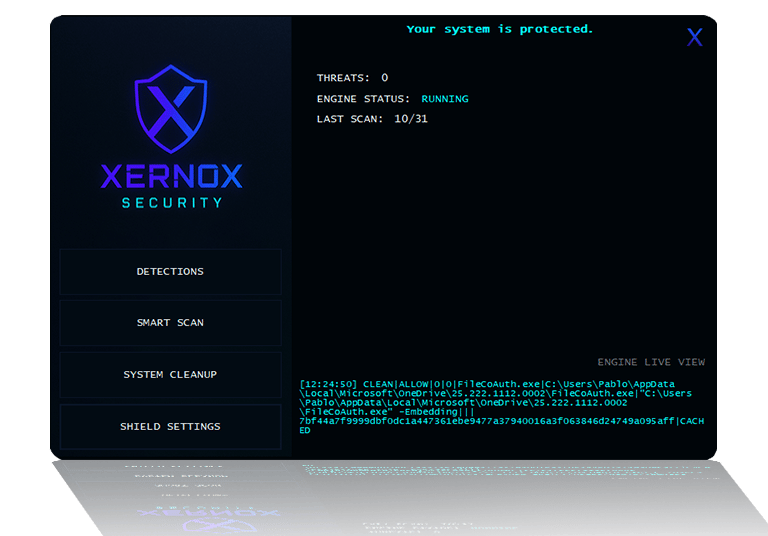
XERNOX SHIELD is designed to protect the system continuously by running in the background. When the user clicks the Close (X) button on the main interface, the application does not shut down. Instead, it minimizes to the system tray, allowing protection to remain active.
While running in the system tray, the user interface remains available to alert and interact with the user whenever malicious or suspicious activity is detected. This ensures timely visibility and response without interrupting normal workflow.
The user may right-click the tray icon and choose to Exit the user interface. However, this is not recommended, as closing the UI prevents visual alerts and direct user interaction during detection events. Core protection remains active, but notifications may be missed.
XERNOX SHIELD is implemented using native code, allowing it to operate efficiently with minimal system overhead. On most modern systems, resource usage typically remains within 0–2% CPU utilization, ensuring continuous protection without noticeable performance impact.
TELEMETRY
XERNOX SHIELD uses minimal, fully anonymous telemetry strictly for operational statistics. No personal data, system identifiers, file contents, or user behavior information are collected.
The user interface communicates with the XERNOX servers using two endpoints only:
/heartbeat.php
Periodically pinged to maintain a live count of active XERNOX SHIELD installations./log_detection.php
Pinged only when a confirmed malware detection occurs, allowing XERNOX to maintain a real-time global count of detected threats.
Each request simply increments a counter in the database. No IP addresses, hardware identifiers, usernames, file paths, hashes, or behavioral data are stored or transmitted. The server responds only to acknowledge the request.
This lightweight telemetry exists solely to measure product usage and detection effectiveness while preserving complete user anonymity and privacy.
Contact
Secure your digital world with us.
© 2025. XERNOX SECURITY LLC, All rights reserved.